
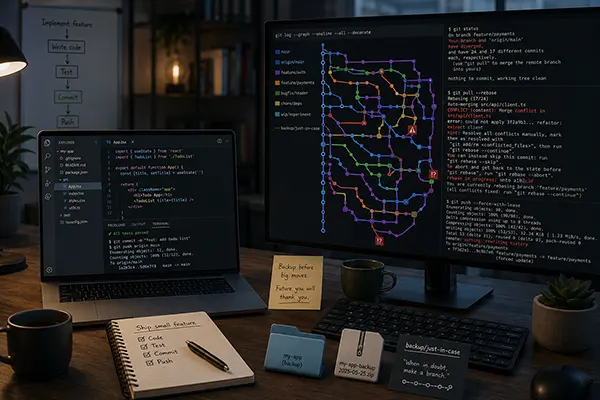
We Need to Be More Honest About Git
Git is powerful, widely adopted, and almost impossible to avoid, but that does not make it intuitive or well suited to everyday development work. Once branches diverge, conflicts appear, history is rewritten, or changes must move between releases, Git exposes developers to a complicated and often opaque internal model.
This article examines why junior developers should not be ashamed of finding Git difficult, why senior engineers quietly create backup branches and ZIP files, and why teams should simplify their workflows instead of pretending the tool is easy.
If you are already wrestling with this question in your own company, we offer a 2 week CTO Health Check and ongoing Fractional CTO support. You can book a 30-min free call or view the services whenever it is convenient, or simply email us at info@sharplogica.com if you have specific questions.
Introduction
I have been writing code for more than 40 years. During that time, I have worked with many programming languages, operating systems, development environments, source-control systems, architectural styles, and generations of tooling that promised to make software development easier. Some disappeared because better alternatives arrived, while others survived because they solved a difficult problem well enough to justify their shortcomings.
Git belongs in the second category.
I use Git, and every development team I work with uses Git. There is no practical way around it, and I am not proposing that companies abandon it tomorrow. Its ecosystem is enormous, its distributed model is powerful, and it handles large repositories and complex histories with capabilities that earlier version-control systems did not have.
But after using it across many projects and watching developers at every level struggle with it, I think we need to stop pretending that Git is a well-designed everyday development tool.
Git is unnecessarily complicated, frequently opaque, and remarkably poor at helping developers understand what state their work is in. It works well while the workflow remains simple, but once branches diverge, conflicts appear, history is rewritten, or work must move between branches, ordinary development can turn into an exercise in repository archaeology.
The industry’s usual answer is that developers should understand Git better. There is truth in that, but it also provides a convenient excuse for the tool. When thousands of competent developers repeatedly misunderstand the same operations, fear the same commands, and require the same handful of experts to rescue them, perhaps the problem is not entirely with the developers.
Junior developers, in particular, need to hear this clearly:
If Git confuses you, that does not mean you are not a real developer. It means you are using a difficult tool whose interface exposes too much internal machinery and explains too little about the practical consequences of its operations.
Many senior developers are not nearly as comfortable with Git as they appear. They have simply learned which paths to avoid, which commands to copy from previous incidents, and whom to call when the repository enters a state they no longer trust.
Git Is Pleasant While Almost Nothing Is Happening
The basic Git workflow is straightforward:
git pull
git add .
git commit -m "Fix invoice calculation"
git push
One developer retrieves the current code, changes a few files, records those changes, and sends them back to the shared repository. As long as nobody else has changed the same files, the branch has not diverged, the remote repository has not moved unexpectedly, and no work exists in an unusual local state, Git feels manageable.
Unfortunately, that is a carefully controlled version of software development.
Real development teams rarely work through one neatly isolated change at a time. Features often remain open while unrelated work reaches the main branch, production problems interrupt planned development, pull requests wait for review, release branches remain active longer than expected, and developers move between tasks as priorities change. A single fix may also need to be applied across several supported versions of the product, which means the Git workflow must accommodate overlapping work rather than assume a clean, linear progression from one completed task to the next.
Consider an entirely normal feature workflow:
git checkout main
git pull

git checkout -b feature/customer-export

# Work on the feature
git add src/ExportService.cs
git add src/ExportController.cs
git commit -m "Add customer export"

git push -u origin feature/customer-export
So far, the commands are understandable. While the feature is under development, however, other changes are merged into main. The team requires feature branches to be rebased before a pull request can be completed.
git checkout main
git pull

git checkout feature/customer-export
git rebase main
Git reports conflicts. The developer edits the files, decides how two sets of changes should be combined, and stages the result.
git status

git add src/ExportService.cs
git rebase --continue

Another conflict appears in a later commit.

git add src/ExportController.cs
git rebase --continue
The developer eventually completes the rebase and tries to push.
git push
Git rejects it because the rebase replaced the original commits with new commits. The files may look almost identical, but their commit identities have changed.
The developer must now run:
git push --force-with-lease
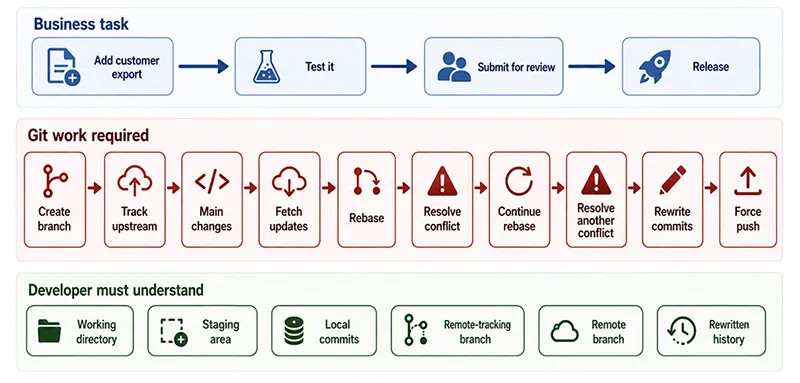
We should pause over how much knowledge this supposedly ordinary workflow requires. The developer must understand the working directory, staging area, local branch, remote branch, remote-tracking reference, commit identity, branch ancestry, conflict state, and the consequences of replacing history that may already have been shared.
They must also understand why --force-with-lease is less dangerous than --force, what the “lease” represents, and under which circumstances even the safer command can overwrite work.
This is not an obscure administrative operation, but it is how many teams expect developers to complete an ordinary feature.
The development task was to add a customer export. The difficult part became manipulating the history of the repository without damaging anyone else’s work.
Git Was Designed for a Different World
Git was created for Linux kernel development, an unusually distributed and technically sophisticated environment involving large numbers of contributors, patch exchange, parallel work, subsystem maintainers, and careful control over how changes move through the project.
For that environment, Git was an impressive solution. It was fast, distributed, resistant to certain forms of corruption, and exceptionally capable at representing and manipulating source history.
It then became the standard tool for almost every development team.
A six-person team building an internal workflow application now uses the same conceptual machinery. So does a digital agency maintaining customer websites, a bank building line-of-business systems, and a startup trying to release its first commercial product. Most of these teams are not managing Linux kernel development, but every developer is still expected to understand branches, refs, rebases, detached states, reflogs, merge commits, cherry-picks, upstream tracking, and multiple meanings of reset.
The usual defense is that teams do not have to use all those features. That is true until something goes wrong, for instance a developer may never intentionally use the reflog, but someone will eventually need it to recover work. A team may avoid rebasing until a branch diverges and their chosen workflow requires it. A developer may never plan to enter a detached HEAD state, but can arrive there through an apparently harmless checkout or submodule operation.
Git’s complexity is optional only while everything continues to work. Once the repository enters an unexpected state, knowledge of that complexity becomes mandatory.
Git Speaks Clearly Only to People Who Already Understand It
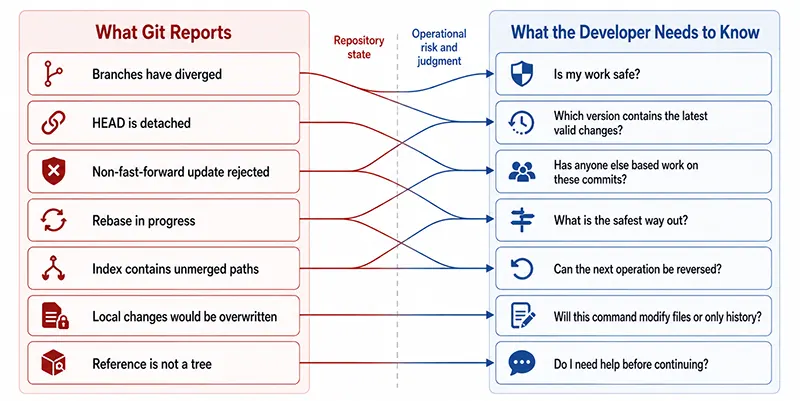
Git’s messages are usually technically accurate, but are also often useless to the person who most needs help.
A developer pulls from the remote repository and receives:
hint: You have divergent branches and need to specify how to reconcile them.
hint: You can do so by running one of the following commands sometime before
hint: your next pull:
hint:
hint:   git config pull.rebase false
hint:   git config pull.rebase true
hint:   git config pull.ff only
Git has correctly identified that the histories have diverged. It then offers three configuration choices whose consequences are not explained in terms of the developer’s actual situation.
Should the developer merge? Rebase? Refuse anything other than a fast-forward? Has the local history already been shared? Does the team preserve merge commits? Will rebasing require a force push? Could another developer be working from those commits?
Git does not know the answers, but it rarely frames the decision in a way that helps the user ask the right questions.
A developer may also see:
You are in 'detached HEAD' state. You can look around, make experimental changes and commit them, and you can discard any commits you make in this state without impacting any branches by switching back to a branch.
The message is more descriptive than older Git output, but it still assumes the reader understands what HEAD is, what it means for HEAD to be detached, and why commits created in that state may later become difficult to locate.
Another common message says:
Updates were rejected because the tip of your current branch is behind its remote counterpart. Integrate the remote changes before pushing again.
“Integrate the remote changes” sounds reassuringly simple. In practice, it may mean: merging, rebasing, resetting, creating a safety branch, inspecting the remote history, or discovering that someone force-pushed the branch and replaced commits the developer still has locally.
Even the word reset has several meanings:
git reset --soft HEAD~1
git reset --mixed HEAD~1
git reset --hard HEAD~1
These commands look almost identical, but their effects are not.
A soft reset moves the branch pointer while preserving changes in the staging area. A mixed reset also removes them from the staging area but keeps them in the working directory. A hard reset changes the branch, staging area, and working directory, potentially removing local work.
A developer searching online for “undo last commit” may encounter any of them.
The most dangerous version is also the one with the most reassuringly decisive name:
git reset --hard
Git terminology often describes the internal operation rather than the human consequence. “Hard” does not tell the developer which work will disappear, whether it can be recovered, or whether untracked files are involved. The person is expected to understand the model before issuing the command that may punish them for not understanding it.
The conclusion why this is wrong is a principal one: a tool should not require the user to interpret a graph-theory problem before determining whether their afternoon’s work is safe.
Stashing Is Simple Until the Stash Becomes Another Repository
Git stash is usually introduced as a convenient way to put unfinished work aside:
git stash
git checkout main
git pull
git checkout feature/customer-export
git stash pop
This works until the developer has several stashes:
git stash list
The output may look like this:
stash@{0}: WIP on feature/customer-export: a142dc8 Add CSV writer
stash@{1}: WIP on main: 31fd813 Fix authentication timeout
stash@{2}: On feature/reporting: temporary query changes
The developer must remember which stash contains which work, whether untracked files were included, and whether pop will apply cleanly to the current branch.
git stash pop stash@{1}
A conflict occurs. The stash may or may not remain in the list depending on whether Git considered the application successful, and developer now has partially applied changes from another branch mixed into the current working directory.
There is nothing fundamentally wrong with the stash mechanism. It is another miniature history system inside the history system, complete with references, ordering, application semantics, and conflicts.
Developers often use it because switching context is common. They then learn, usually through experience, that a temporary branch is sometimes safer and easier to understand:
git checkout -b backup/customer-export-wip
git add .
git commit -m "WIP: preserve customer export changes"
That workaround is revealing. To avoid uncertainty in one Git feature, developers create another branch and a commit they never wanted.
Cherry-Picking Looks Precise Until History Starts Repeating Itself
Cherry-picking is another powerful feature that appears to solve a routine need. A production fix was committed to one branch, and the same fix is required elsewhere.
git checkout release/2.4
git cherry-pick a84fd19
The operation copies the change represented by the selected commit and creates a new commit on the current branch. The new commit has different identity even though it may introduce the same file changes.
Later, the release branch is merged into main, where the original commit already exists. Git may recognize equivalent changes, or it may encounter conflicts depending on what happened around them. The team now has two commits representing the same conceptual change, and developers inspecting history must understand why both exist.
When several fixes are involved, the sequence grows:
git cherry-pick a84fd19
git cherry-pick c61b420
git cherry-pick f1902ae
If the second cherry-pick conflicts:
git status
git add src/BillingService.cs
git cherry-pick --continue
Or perhaps the developer decides to abandon it:
git cherry-pick --abort
If the first commit was already applied successfully, aborting the second cherry-pick does not necessarily return the branch to where it was before the entire series began. The developer must understand which operations completed and which one is currently active.
Again, Git is doing exactly what it was designed to do. The issue is that a request as simple as “put this fix into the supported release” can create duplicate histories and require careful reasoning about partially completed operations.
Merge Conflicts Are Not Really File Problems
Merge conflicts are often presented as a normal inconvenience of team development. Two people changed the same lines, so someone must decide which version to keep.
The visible conflict may look like this:
<<<<<<< HEAD
var total = invoice.Items.Sum(x => x.Price);
=======
var total = invoice.Items.Sum(x => x.Price * x.Quantity);
>>>>>>> feature/quantity-pricing
This example is manageable: a developer can inspect both versions and determine that quantity should be included.
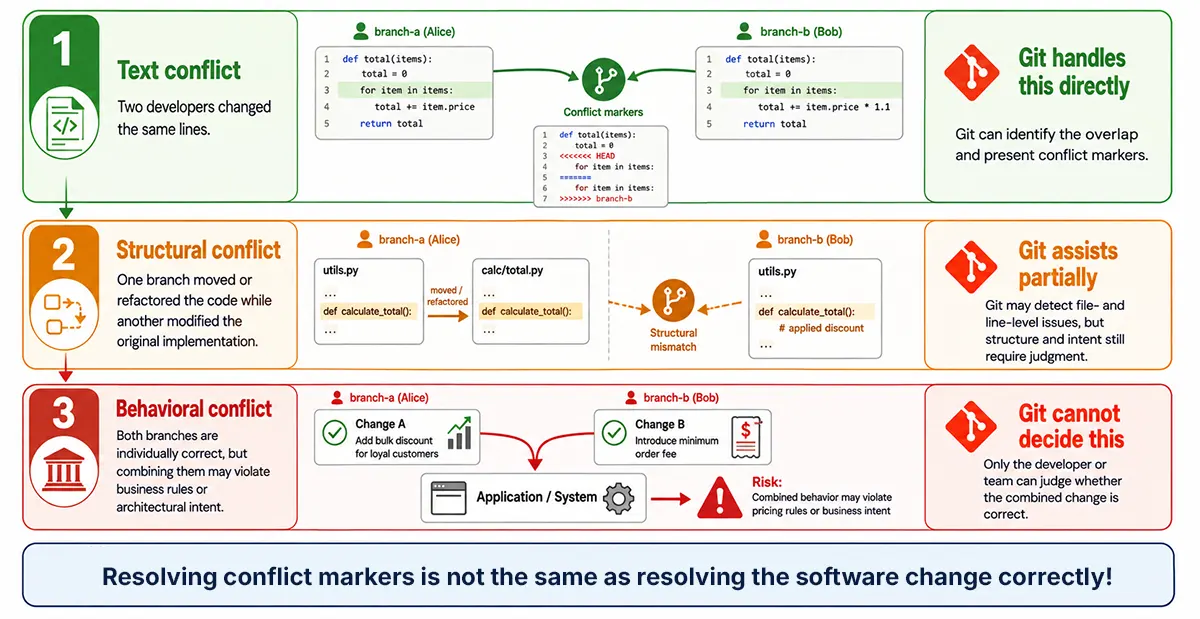
Real conflicts are often more difficult: one branch may have moved the calculation into another service, while another added discount handling to the old implementation. Git can show that the text differs, but it cannot explain the architectural intent behind either change.
<<<<<<< HEAD
var total = _pricingService.Calculate(invoice);
=======
var subtotal = invoice.Items.Sum(x => x.Price * x.Quantity);
var total = _discountService.Apply(subtotal, customer.DiscountLevel);
>>>>>>> feature/customer-discounts
Selecting both sides does not necessarily produce valid behavior. Selecting one may silently remove an important change. The person resolving the conflict needs to understand both features, the architecture, and the business rules.
Yet once the conflict markers disappear and the files compile, Git considers the conflict resolved.
git add src/InvoiceService.cs
git commit
This is where Git problems become production problems. A technically completed merge can still contain a semantic error that neither Git nor developer notices immediately.
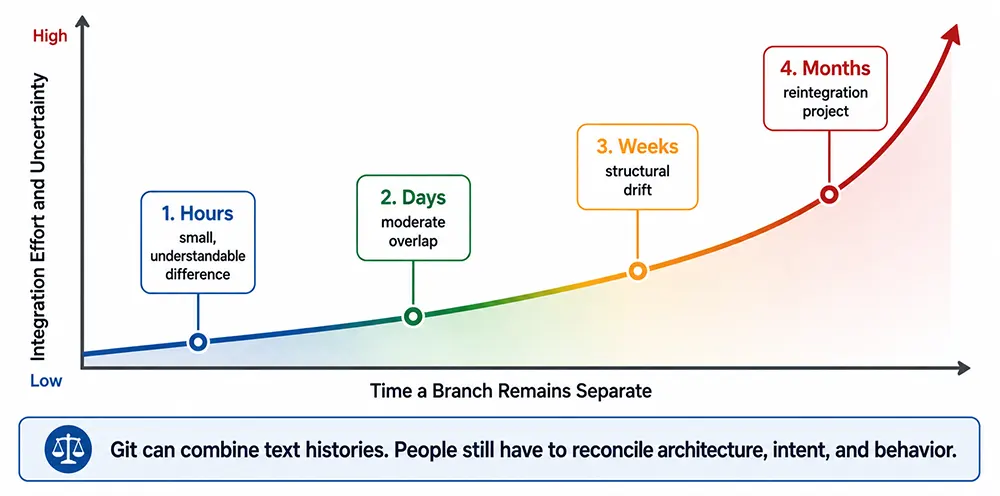
The longer branches remain separate, the more likely their conflicts represent competing assumptions rather than overlapping text. At that point, merging is not version-control administration: it is system-design work performed under pressure inside a conflict editor.
Reverting a Merge Is Where Confidence Often Disappears
A normal commit can usually be reverted with:
git revert a84fd19
A merge commit is different because it has more than one parent. Git asks the developer to identify the mainline parent:
git revert -m 1 b61cc42
The -m 1 option does not mean “revert one commit.” It tells Git which parent should be treated as the mainline when calculating the inverse of the merge.
Choosing the wrong parent can reverse the wrong side of the history. Even when the correct parent is chosen, reverting the merge does not make Git forget that the branch was previously merged. Attempting to merge the same branch again may not restore the reverted changes because Git’s ancestry still records the earlier merge.
Teams then create new commits, revert the revert, rebase the feature onto a new branch, or reconstruct the changes manually.
This is where the calm senior developer often becomes noticeably less calm.
A tool that can preserve and manipulate history this precisely is technically impressive. A workflow in which reversing an unwanted merge requires understanding parent selection and future ancestry behavior is not an approachable everyday interface.
Every Company Eventually Finds Its Git Priests
Most development organizations have one or two people who are summoned when Git becomes difficult. Their role may not appear in the organizational chart, but everyone knows who they are.
A developer reports that their commits have disappeared after a rebase...or someone force-pushed a shared branch...or a submodule is pointing at a commit that nobody can check out. Maybe a merge was reverted and now cannot be reintroduced, or a release branch contains a fix that never made it back to main.
The Git expert joins a call and starts investigating:
git status
git log --oneline --graph --decorate --all
git reflog
git branch -vv
git remote -v
git show a84fd19
They may create rescue branches before doing anything else:
git branch rescue/customer-export-before-recovery
They inspect the reflog:
a84fd19 HEAD@{0}: rebase (finish): returning to refs/heads/feature/customer-export
412cd90 HEAD@{1}: rebase (pick): Add export validation
891de21 HEAD@{2}: rebase (start): checkout main
7ad1b3f HEAD@{3}: commit: Add export validation
Eventually, they recover the missing commit:
git checkout -b recovered/customer-export 7ad1b3f
This is valuable expertise, but we should be honest about what is happening. An everyday development tool has entered a state that ordinary users cannot safely interpret, so a specialist is reconstructing the movement of internal references from a recovery log.
We would not accept this level of routine dependence on specialists from most other tools. Imagine an office application in which deleting the wrong paragraph required a document-history engineer to inspect internal object references. We would call that application badly designed.
With Git, we call it professional competence.
A tool used by every developer should not regularly require a priesthood to explain what it has done.
Junior Developers Are Not the Problem
Junior developers usually encounter Git in an environment where everyone else appears to understand it. They hear experienced engineers use terms such as rebase, squash, fast-forward, upstream, detached HEAD, and reflog as though the meaning were self-evident.
When they become confused, they often assume the problem is them.
They may be reluctant to admit that they do not understand what origin/main actually represents, why their branch can be “ahead by two and behind by four,” or why pulling sometimes creates a merge commit and sometimes does not. They memorize a handful of commands and follow instructions without developing a reliable mental model of what will happen.
This creates a particularly dangerous situation. The developer knows enough to issue commands but not enough to predict their consequences.
git pull
git push
git reset --hard
git clean -fd
Commands such as these often appear in online answers without enough context. git clean -fd, for example, can permanently remove untracked files and directories:
git clean -fd
A safer preview exists:
git clean -fdn
The difference is one letter: one shows what would be deleted; the other deletes it!
A junior developer who finds this intimidating is responding rationally.
Senior developers should stop treating Git confusion as a rite of passage. Explaining the model is part of our responsibility, but so is acknowledging that the model is difficult and the interface is unforgiving. Telling someone to “learn Git properly” does not improve a tool whose dangerous and diagnostic commands often differ by a small option.
Junior developers have nothing to be ashamed of. Their confusion is not evidence that they do not belong in software development, it is evidence that Git has normalized a level of incidental complexity we would criticize immediately in almost any other tool.
Senior Developers Are Often Performing Confidence
The more uncomfortable truth is that senior developers are not always as confident as they sound.
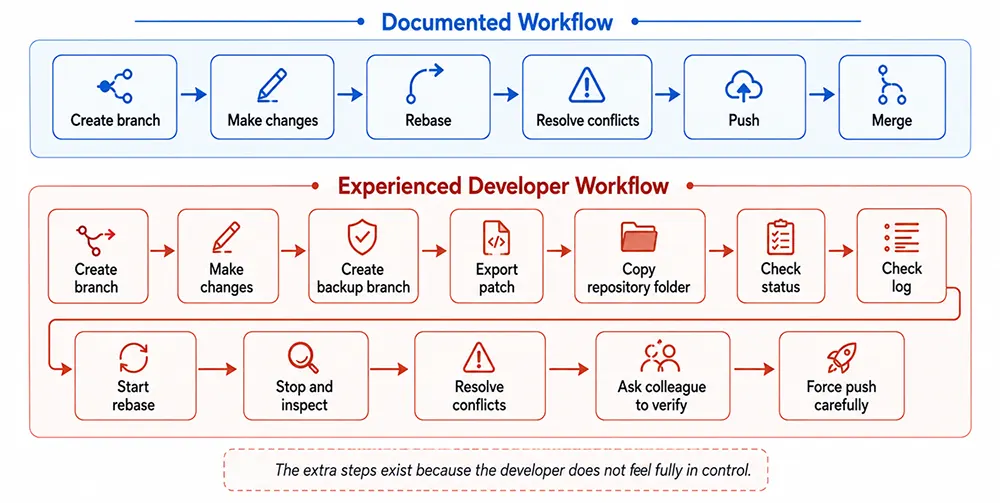
They know more commands, recognize more failure states, and have a better chance of recovering lost work. They also know enough to understand how badly things can go, and many therefore create informal safeguards before attempting an operation they do not fully trust.
They create a backup branch:
git branch backup/before-rebase
They generate a patch:
git diff > customer-export-backup.patch
They copy untracked files elsewhere:
git ls-files --others --exclude-standard
They duplicate the repository directory or create a ZIP archive before rebasing, resetting, cleaning, or restructuring branches.
I have seen this in many companies, including among very experienced engineers: nobody announces it proudly. The backup is made quietly because the developer wants a copy that exists outside Git’s model and cannot be altered by the next Git command.
The public position is that Git is completely safe because commits can usually be recovered through the reflog. The private position is often “I am going to copy this folder before I touch anything".
That gap matters.
Creating a safety branch is good practice, and making backups is never foolish. What is revealing is the lack of confidence that drives those actions. Developers are using an external copy to regain a feeling of control that the version-control system itself is supposed to provide.
When experienced engineers ZIP a version-controlled project before using version-control operations, we should stop blaming education and start questioning the interface.
Graphical Tools Help, but They Also Prove the Point
Graphical Git clients improve the experience considerably. They make branches visible, show differences more clearly, reduce command memorization, and help developers understand which files are staged or modified.
There is no reason to look down on developers who prefer them. The purpose of source control is to manage software safely, not to demonstrate comfort with terminal commands.
Still, the existence of an entire software category devoted to making Git understandable should tell us something. The graphical client acts as a translation layer between Git’s conceptual model and the developer.
A graphical interface can simplify how these operations are presented, but it cannot eliminate their underlying behavior: a visual rebase still rewrites commits, a force-push button can still replace remote history, and a conflict-resolution screen may help combine lines without being able to determine which resulting business behavior is actually correct.
Some interfaces add new uncertainty by using broad commands such as “Sync.” Depending on the product and configuration, that button may fetch, pull, merge, rebase, and push. When the operation succeeds, the abstraction feels convenient. When it fails, the developer is left investigating several Git operations they did not explicitly choose.
The GUI helps until something unexpected happens: then the command line reappears, usually accompanied by a search query containing the exact error message.
We Also Make Git Worse Through Process
Git has serious usability problems, but teams frequently magnify them with complicated branch strategies.
A repository may contain main, develop, feature branches, release branches, hotfix branches, integration branches, environment branches, and customer-specific branches. The workflow diagram looks controlled because every type of work has a designated path.
The actual work often involves repeated merging and cherry-picking across branches that have drifted apart. A production fix starts in a hotfix branch, moves to a release branch, reaches main, and must then be brought into develop. Meanwhile, another branch contains a partially completed refactoring of the same code.
The process creates conflicts, duplication, and uncertainty about which branch contains the authoritative implementation. Git provides the mechanics, but the team has designed a system that repeatedly exercises the most difficult parts of those mechanics.
For many teams, a simpler workflow is safer. Keep branches short-lived, integrate frequently, avoid rewriting shared history, automate tests, and reduce the number of paths through which a change must travel.
That will not make Git intuitive, but it limits how often the team has to perform advanced history manipulation during ordinary delivery.
The Cost Is Not the Time Spent Typing Commands
Git appears inexpensive because most individual commands complete quickly, and developers do not spend hours typing git add or git commit.
The real cost appears in: interrupted concentration, delayed reviews, recovery work, repeated conflict resolution, branch coordination, onboarding, and fear of making the wrong move. Two developers may lose an afternoon reconstructing work after a rebase, a release may be held while someone determines which branch contains the production fix, and a junior engineer may postpone integration for several days out of fear of the conflicts, making the eventual merge even more difficult..
Teams also spend time defining and teaching local rules. Should developers merge or rebase? Is force pushing permitted? Must commits be squashed? Where do hotfixes begin? How are release fixes brought back into the main development line? Are submodules updated automatically? Which button in the approved GUI corresponds to which Git operation?
Git’s flexibility means organizations must design their own safe subset of Git. They document the subset, teach it, automate portions of it, and rely on experts when someone leaves its boundaries.
That cost is rarely measured because it is spread across the development organization. It appears as a delayed pull request here, a screen-sharing recovery session there, and a few hours of onboarding somewhere else: but it's still a cost.
We Have to Use Git, but We Do Not Have to Pretend
Git is not going away. Its ecosystem, hosting platforms, CI/CD integrations, and accumulated industry knowledge make replacement unlikely. Any alternative would have to be technically credible and compatible with an enormous amount of existing infrastructure.
We can also be more honest about what we are using. Git is a sophisticated history-manipulation engine with a difficult human interface. It is highly capable when operated by people who understand its model, and surprisingly hostile when users leave the narrow path of straightforward commits and pushes.
Teams can reduce the damage by simplifying branch strategies, integrating frequently, avoiding unnecessary history rewriting, providing real training, and documenting safe recovery procedures. They can encourage developers to create safety branches and use graphical tools without treating either practice as evidence of weakness.
Most importantly, they should stop shaming people for finding Git difficult.
A junior developer who does not understand why a rebase changed every commit is not stupid. A senior engineer who creates a backup before resetting a branch is not incompetent. Both are responding to a tool that requires a disproportionate amount of internal knowledge before its behavior feels predictable.
Git became the standard because it solved important technical problems, not because it offered a clear and humane development experience.
We have to use it, and there is currently no realistic way around that.
But among ourselves, at least, we can stop pretending it is a good everyday tool.
Discussion Board Coming Soon
We're building a discussion board where you can share your thoughts and connect with other readers. Stay tuned!
Ready for CTO-level Leadership Without a Full-time Hire?
Let's discuss how Fractional CTO support can align your technology, roadmap, and team with the business, unblock delivery, and give you a clear path for the next 12 to 18 months.
Or reach us at: info@sharplogica.com