
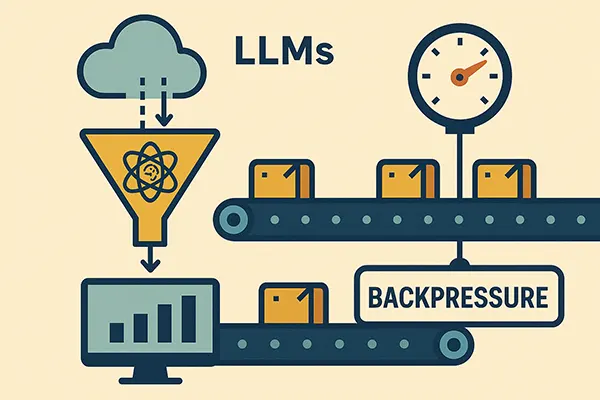
Surviving LLM Rate Limits: Building Backpressure
Once you move beyond a toy demo and start running real workloads on top of a large language model, rate limits stop being a theoretical concern and become a very practical constraint. At small scale you can mostly ignore them. At medium scale you start seeing occasional 429 errors and retriable failures. At larger scale your whole system can suddenly feel brittle: bursts of errors, retries piling up, and users waiting far longer than they should.
Building Reliable AI Pipelines on Azure: A Real-World Retry Pattern That Actually Works
Once you move beyond a toy demo and start running real workloads on top of a large language model, rate limits stop being a theoretical concern and become a very practical constraint. At small scale you can mostly ignore them. At medium scale you start seeing occasional 429 errors and retriable failures. At larger scale your whole system can suddenly feel brittle: bursts of errors, retries piling up, and users waiting far longer than they should.
A big part of that pain comes from the fact that LLM rate limits are not like typical REST APIs. They are shaped around tokens and deployments, not just request counts. You are dealing with a shared capacity that resets in fixed windows, and everything you send to the model consumes some of that capacity.
If you treat LLMs as “just another HTTP call” and scale by throwing more workers at the problem, you eventually hit a wall. Those extra workers don’t give you more effective throughput; they just help you hit the limit faster and in a more chaotic way.
What you need instead is backpressure built into your pipeline: a way to control how much work you send to the model per unit of time, based on the real capacity you have.
How LLM Rate Limits Actually Work
With a typical REST API, you might see a limit like “600 requests per minute.” That’s easy to reason about. You can throttle on the number of calls and you’re done.
With LLM APIs, you often get something more complex: tokens per minute and requests per minute, per model deployment, sometimes per region. A single deployment might allow ninety thousand tokens per minute and three hundred requests per minute. A single user job can easily consume thousands of tokens, especially if you send long documents or chain multiple steps.
That means your practical throughput depends on:
- How many calls you make.
- How “big” those calls are in tokens.
- How many deployments you have.
- How evenly you spread work across them.
Two workloads with the same number of requests can behave very differently if one of them has prompts ten times larger. If you don’t account for tokens, you can hit limits in surprising ways and at moments you don’t expect.
Why Adding More Workers Makes Things Worse
A common reaction to slow processing is to scale up: add more Function instances, more containers, more threads. That works fine when the bottleneck is CPU or your own database.
When the bottleneck is an external LLM deployment with hard rate limits, scaling out your own workers can be counterproductive. Now you have more actors trying to call the model at the same time, all unaware of each other. When you get close to the limit, they all tip over together. You see a spike of 429 errors, each worker retries, and in the worst case you build a self-inflicted denial of service on top of the quota you actually have.
The root problem is that your workers do not share any understanding of “how much capacity is left.” Each one acts independently and optimistically. To fix that, you need a shared view of the token budget and a simple rule: do not call the model if there is no room in the current window.
A Queue-Centric Backpressure Pattern
Queues are a natural fit for backpressure. A queue represents all pending work. Workers represent processing capacity. If workers slow down, the queue grows but the system stays stable.
You can extend that idea to LLM limits by inserting a small component between “message pulled from queue” and “call the LLM.” This component knows the token budget and can answer a simple question: is there enough capacity left this minute to process this message?
If the answer is yes, the worker proceeds. If the answer is no, the worker defers the work: it either requeues the message with a small delay or temporarily backs off.
Conceptually, you get this flow:
-
Message arrives on the processing queue.
-
Worker pulls the message.
-
Worker estimates how many tokens this job will consume.
-
Worker asks the token gate whether those tokens can be reserved.
-
If yes, it calls the LLM and later records actual usage.
-
If no, it reschedules the message for later.
Implementing a Token Budget Store
To make this work, you need a place to track token usage per deployment and per time window. In a real system this would be backed by a shared store like Redis or SQL. To keep the example focused, we can start with an in-memory implementation that captures the core logic.
First, define a simple interface:
public interface ITokenBudgetStore
{
    Task<int> GetTokensUsedInCurrentWindowAsync(string deployment);
    Task AddTokensAsync(string deployment, int tokens);
}
Then implement a naive in-memory version:
public class InMemoryTokenBudgetStore : ITokenBudgetStore
{
    private readonly object _lock = new();
    private readonly Dictionary<string, (DateTime windowStart, int used)> _state = new();
    private readonly TimeSpan _window = TimeSpan.FromMinutes(1);

    public Task<int> GetTokensUsedInCurrentWindowAsync(string deployment)
    {
        lock (_lock)
        {
            var now = DateTime.UtcNow;

            if (!_state.TryGetValue(deployment, out var entry) ||
                now - entry.windowStart > _window)
            {
                _state[deployment] = (now, 0);
                return Task.FromResult(0);
            }

            return Task.FromResult(entry.used);
        }
    }

    public Task AddTokensAsync(string deployment, int tokens)
    {
        lock (_lock)
        {
            var now = DateTime.UtcNow;

            if (!_state.TryGetValue(deployment, out var entry) ||
                now - entry.windowStart > _window)
            {
                _state[deployment] = (now, tokens);
            }
            else
            {
                _state[deployment] = (entry.windowStart, entry.used + tokens);
            }
        }

        return Task.CompletedTask;
    }
}
This tracks how many tokens have been used per deployment in the current one-minute window and resets the counter when the window rolls over.
Adding a Throttle on Top of the Store
The next layer is a small throttle that knows the maximum tokens per minute for a deployment and uses the store to decide whether a new call should be allowed.
public class TokenThrottle
{
    private readonly ITokenBudgetStore _store;
    private readonly string _deploymentName;
    private readonly int _maxTokensPerMinute;

    public TokenThrottle(ITokenBudgetStore store, string deploymentName, int maxTokensPerMinute)
    {
        _store = store;
        _deploymentName = deploymentName;
        _maxTokensPerMinute = maxTokensPerMinute;
    }

    public async Task<bool> TryReserveAsync(int estimatedTokens)
    {
        var used = await _store.GetTokensUsedInCurrentWindowAsync(_deploymentName);

        if (used + estimatedTokens > _maxTokensPerMinute)
        {
            return false;
        }

        await _store.AddTokensAsync(_deploymentName, estimatedTokens);
        return true;
    }
}
The semantics are simple: if reserving this many tokens would exceed the budget, return false; otherwise, record the reservation and proceed.
Worker Logic with Backpressure
Now you can integrate this throttle into a worker that processes messages from a queue. The worker estimates tokens, checks the throttle, and decides whether to call the LLM or defer the work.
public class AnalysisMessage
{
    public string JobId { get; set; } = default!;
    public string Payload { get; set; } = default!;
}

public interface ILlmClient
{
    Task<LlmResult> AnalyzeAsync(string prompt);
}

public class LlmResult
{
    public bool Success { get; set; }
    public string Output { get; set; } = string.Empty;
    public int PromptTokens { get; set; }
    public int CompletionTokens { get; set; }
    public string? Error { get; set; }
}
Here is the worker:
public class AnalysisWorker
{
    private readonly TokenThrottle _throttle;
    private readonly ILlmClient _llmClient;
    private readonly IQueueClient _queueClient;

    public AnalysisWorker(TokenThrottle throttle, ILlmClient llmClient, IQueueClient queueClient)
    {
        _throttle = throttle;
        _llmClient = llmClient;
        _queueClient = queueClient;
    }

    public async Task HandleAsync(AnalysisMessage message)
    {
        int estimatedTokens = EstimateTokens(message.Payload);

        var reserved = await _throttle.TryReserveAsync(estimatedTokens);
        if (!reserved)
        {
            // No capacity right now: reschedule the message for a bit later
            await _queueClient.RequeueWithDelayAsync(message, TimeSpan.FromSeconds(10));
            return;
        }

        var result = await _llmClient.AnalyzeAsync(message.Payload);

        if (!result.Success)
        {
            // You would route this into your retry logic; simplified here
            await _queueClient.RequeueWithDelayAsync(message, TimeSpan.FromSeconds(20));
            return;
        }

        // Persist the successful result, update job status, etc.
        await PersistResultAsync(message.JobId, result.Output);

        // Optionally, you could correct the token usage here if your estimate was off
    }

    private int EstimateTokens(string text)
    {
        // Very rough proxy: characters / 4 + some margin for completion, in a real solution use TikToken or some other lib
        int promptTokens = text.Length / 4;
        const int completionMargin = 256;
        return promptTokens + completionMargin;
    }

    private Task PersistResultAsync(string jobId, string output)
    {
        // Store in database or blob storage etc.
        return Task.CompletedTask;
    }
}
In a real Azure Function you would wire this inside a function using a ServiceBusTrigger, but the core logic remains the same: check the budget before you call.
An Azure Function Example with Delayed Requeue
To make this concrete in an Azure Functions context with Service Bus:
public class AnalysisFunction
{
    private readonly AnalysisWorker _worker;

    public AnalysisFunction(AnalysisWorker worker)
    {
        _worker = worker;
    }

    [Function("AnalysisFunction")]
    public async Task RunAsync(
        [ServiceBusTrigger("analysis-queue", Connection = "ServiceBusConnection")]
        AnalysisMessage message)
    {
        await _worker.HandleAsync(message);
    }
}
And a simple queue client that can requeue with delay:
public interface IQueueClient
{
    Task RequeueWithDelayAsync(AnalysisMessage message, TimeSpan delay);
}

public class ServiceBusQueueClient : IQueueClient
{
    private readonly ServiceBusSender _sender;

    public ServiceBusQueueClient(ServiceBusSender sender)
    {
        _sender = sender;
    }

    public async Task RequeueWithDelayAsync(AnalysisMessage message, TimeSpan delay)
    {
        var body = BinaryData.FromObjectAsJson(message);
        var msg = new ServiceBusMessage(body)
        {
            ScheduledEnqueueTime = DateTimeOffset.UtcNow.Add(delay)
        };

        await _sender.SendMessageAsync(msg);
    }
}
With this setup, if the throttle refuses a call because the token budget is exhausted, the work is not lost. It is simply postponed, and the LLM never sees the spike.
Moving from In-Memory to a Shared Budget
The in-memory store is useful for illustrating the pattern, but in production you will have multiple instances of your functions or containers. They all need to see the same budget. That calls for a shared store.
One straightforward option is a SQL table:
CREATE TABLE TokenUsage (
    Id INT IDENTITY PRIMARY KEY,
    DeploymentName NVARCHAR(100) NOT NULL,
    WindowStart DATETIME2 NOT NULL,
    TokensUsed INT NOT NULL
);

CREATE INDEX IX_TokenUsage_Deployment_Window
    ON TokenUsage (DeploymentName, WindowStart);
Then you can implement ITokenBudgetStore using SQL and a one-minute bucket:
public class SqlTokenBudgetStore : ITokenBudgetStore
{
    private readonly SqlConnection _connection;
    private readonly TimeSpan _window = TimeSpan.FromMinutes(1);

    public SqlTokenBudgetStore(SqlConnection connection)
    {
        _connection = connection;
    }

    public async Task<int> GetTokensUsedInCurrentWindowAsync(string deployment)
    {
        var (start, end) = GetWindowRange();

        const string sql = @"
            SELECT ISNULL(SUM(TokensUsed), 0)
            FROM TokenUsage
            WHERE DeploymentName = @Deployment
              AND WindowStart = @WindowStart;";

        var total = await _connection.ExecuteScalarAsync<int>(sql,
            new { Deployment = deployment, WindowStart = start });

        return total;
    }

    public async Task AddTokensAsync(string deployment, int tokens)
    {
        var (start, _) = GetWindowRange();

        const string sql = @"
            MERGE TokenUsage AS target
            USING (SELECT @Deployment AS DeploymentName, @WindowStart AS WindowStart) AS src
            ON target.DeploymentName = src.DeploymentName
               AND target.WindowStart = src.WindowStart
            WHEN MATCHED THEN
                UPDATE SET TokensUsed = TokensUsed + @Tokens
            WHEN NOT MATCHED THEN
                INSERT (DeploymentName, WindowStart, TokensUsed)
                VALUES (@Deployment, @WindowStart, @Tokens);";

        await _connection.ExecuteAsync(sql, new
        {
            Deployment = deployment,
            WindowStart = start,
            Tokens = tokens
        });
    }

    private (DateTime start, DateTime end) GetWindowRange()
    {
        var now = DateTime.UtcNow;
        var start = new DateTime(now.Year, now.Month, now.Day, now.Hour, now.Minute, 0, DateTimeKind.Utc);
        var end = start.Add(_window);
        return (start, end);
    }
}
This is not the only way to do it, but it shows that the same pattern applies with a shared store: track usage per minute per deployment, and consult that before sending more work.
Combining Backpressure with Retries
Backpressure and retries solve different problems but complement each other. Backpressure keeps you from sending more work than the LLM can handle. Retries help you recover from transient failures when the LLM misbehaves even within allowed limits.
In a robust system, you would have:
- A throttle to avoid exceeding tokens per minute.
- A retry pattern for handling occasional 429s, timeouts, or internal errors.
- A queue for regular processing and, if needed, a separate retry queue.
The sequencing matters. You ideally avoid sending calls you know will exceed the budget. For calls that fail anyway, you retry with some delay, and those retried calls go through the same throttle again.
Monitoring and Tuning
Once you have this mechanism in place, you gain new levers for tuning the system. You can track how often the throttle refuses reservations. A high refusal rate means your workload is outgrowing your capacity. You can track how long messages sit in the queue under heavy load. If delays are too high, you might need to request higher quotas or add more deployments and wire them into the routing logic.
You also gain a better view of cost. Since you are explicitly tracking token usage, it becomes much easier to map LLM consumption to tenants, features, or job types. That in turn feeds into pricing and product decisions.
Conclusion
LLM rate limits are not an implementation detail that you can push into a helper library and forget. They are a core constraint that shapes how your whole pipeline should behave. If you respect that constraint explicitly, you can build systems that stay stable even under heavy load or partial provider issues.
The core pattern is simple: track token usage per deployment and time window, check that budget before calling the LLM, and defer work when there is no capacity left. It is not glamorous, but it is one of those small architectural decisions that pays off every day once your usage starts to grow.
Discussion Board Coming Soon
We're building a discussion board where you can share your thoughts and connect with other readers. Stay tuned!
Ready for CTO-level Leadership Without a Full-time Hire?
Let's discuss how Fractional CTO support can align your technology, roadmap, and team with the business, unblock delivery, and give you a clear path for the next 12 to 18 months.
Or reach us at: info@sharplogica.com