
Building Reliable AI Pipelines on Azure
Modern AI systems fail more often than most engineers expect. Not because the models are fragile, but because the infrastructure surrounding them is. Network latency, cold starts, concurrency spikes, and the notorious 429 rate-limit errors all come into play.
Anyone who builds LLM-powered systems quickly learns the same lesson: in production, retries are not optional, they're architecture.
Building Reliable AI Pipelines on Azure: A Real-World Retry Pattern That Actually Works
Modern AI systems fail more often than most engineers expect. Not because the models are fragile, but because the infrastructure surrounding them is. Network latency, cold starts, concurrency spikes, and the notorious 429 rate-limit errors all come into play. Anyone who builds LLM-powered systems quickly learns the same lesson: in production, retries are not optional, they're architecture.
This blog explores a retry pattern we developed while building distributed AI pipelines on Azure. It’s a simple but robust approach that’s token-aware, budget-conscious, and highly observable. If you’re working with OpenAI, Azure OpenAI, or any external LLMs, this pattern should feel both familiar and useful.
And because theory means little without implementation, you’ll see real C# code inspired by the architecture we refined through hard lessons.
Why Retries with LLMs Are a Different Game
In traditional APIs, retries are typically triggered by rare exceptions: transient network failures, 5xx errors, or short outages. With LLM APIs, the rhythm is different. You expect failures. Calls to OpenAI can return 429s even when your traffic is steady. Token limits can be hit midway through a payload. Streaming responses might time out. And every retry carries a cost: you burn tokens, increase latency, and risk amplifying the problem if you retry naïvely.
That’s what makes retry design for AI workloads so different. You’re not retrying occasionally; you’re retrying frequently, and often under pressure.
A retry mechanism for LLM workloads must be budget-aware, concurrency-safe, observable, and fail-safe. A simple “try again with exponential backoff” loop doesn’t cut it when each attempt might consume thousands of tokens or delay downstream workflows.
The Architectural Approach
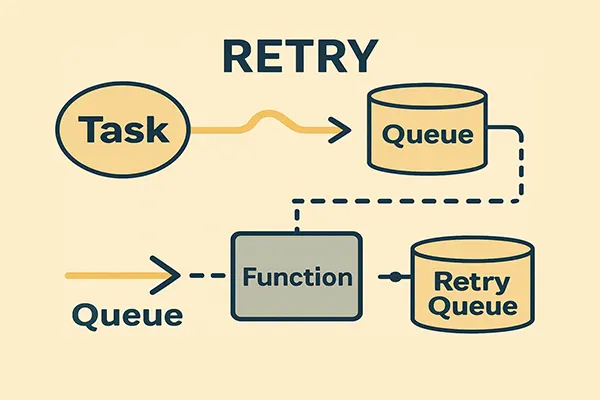
What we needed was a pattern that decoupled retries from immediate processing, added visibility to failure recovery, and allowed us to tune retry frequency independently of the main workload.
The solution centered around three ideas: isolate retries from the main processing loop, explicitly limit attempts and track them, and introduce controlled backoff instead of letting the system hammer the LLM endpoint.
When an LLM call fails in the main worker, the message is not retried in place. Instead, it’s handed off to a dedicated retry queue, processed by a slower and more deliberately constrained worker pool. That separation allows us to throttle retries, add delays, monitor the retry rate, and treat retries as a first-class concern rather than a hidden detail.
Here’s the core of that retry wrapper in C#:
public async Task<Result<T>> ExecuteWithRetriesAsync<T>(
    Func<Task<Result<T>>> operation,
    string jobId,
    int maxAttempts = 3,
    TimeSpan? retryDelay = null)
{
    var delay = retryDelay ?? TimeSpan.FromSeconds(6);

    for (int attempt = 1; attempt <= maxAttempts; attempt++)
    {
        var result = await operation();

        if (result.IsSuccess)
            return result;

        // Log each failed attempt for observability
        await _jobTracking.LogAttemptAsync(jobId, attempt, result.Error);

        if (attempt < maxAttempts)
            await Task.Delay(delay);
    }

    await _jobTracking.MarkAsFailedAsync(jobId, "Exceeded retry attempts.");
    return Result<T>.Failure("Max retry attempts exceeded.");
}
This wrapper gives us structured control over retries and integrates with a job-tracking component. Every failed attempt is logged and visible, which makes debugging and post-mortems far easier. It also becomes a central place to inject extra behavior later on, such as changing regions or adjusting delay based on error type.
Why Inline Retry Isn’t Enough
The code above is helpful, but it still runs inline. For small workloads, that can be fine. Once you have hundreds or thousands of active jobs, inline retries become risky. If a regional OpenAI endpoint starts returning 429s or timeouts, you can very quickly end up with dozens of workers all retrying in sync. That can overwhelm the LLM deployment, burn through your token quota, and create a feedback loop of failure.
To avoid that retry storm effect, we externalized retries into a separate channel. The main worker decides that something should be retried, but not how or when exactly. That responsibility is delegated to a dedicated retry queue and a dedicated retry worker.
Moving Retries to a Dedicated Queue
When a job fails in the primary worker, we push it to a retry queue with metadata describing its current attempt number. The retry queue is processed by a separate Azure Function that can run at a lower concurrency level and with intentionally slower throughput.
Here’s how we enqueue a failed job for retry:
public async Task EnqueueRetryMessageAsync(AnalysisJob job, int attempt)
{
    var retryMessage = new RetryMessage
    {
        JobId = job.JobId,
        Payload = job.Payload,
        Attempt = attempt + 1,
        Timestamp = DateTime.UtcNow
    };

    var message = new ServiceBusMessage(BinaryData.FromObjectAsJson(retryMessage))
    {
        Subject = "analysis-retry",
        ApplicationProperties =
        {
            ["Attempt"] = retryMessage.Attempt
        }
    };

    await _retryQueueSender.SendMessageAsync(message);
}
The key point here is that a failed operation is not an immediate retry. It becomes a new message in a controlled stream of work, with its own policy and its own scaling characteristics. You can scale the primary analysis workers aggressively while keeping the retry workers conservative.
The Controlled Retry Worker
The worker that processes the retry queue is deliberately slower, more measured, and more defensive. It reprocesses failed jobs, but only after applying gradually increasing backoff intervals and checking how many times it has already tried.
A simplified version looks like this:
[Function("RetryWorker")]
public async Task RunAsync(
    [ServiceBusTrigger("retry-queue", Connection = "ServiceBusConnection")]
    RetryMessage message,
    FunctionContext context)
{
    var logger = context.GetLogger("RetryWorker");

    if (message.Attempt > 3)
    {
        await _jobTracking.MarkAsFailedAsync(message.JobId,
            $"Retry attempts exceeded ({message.Attempt}).");

        logger.LogWarning($"Job {message.JobId} marked as failed after {message.Attempt} attempts.");
        throw new Exception("Max retry attempts exceeded.");
    }

    // Simple linear backoff: later attempts wait longer
    await Task.Delay(TimeSpan.FromSeconds(message.Attempt * 5));

    var result = await _analysisProcessor.ProcessAsync(message.Payload);

    if (!result.IsSuccess)
    {
        logger.LogError($"Retry failed for job {message.JobId}, attempt {message.Attempt}: {result.Error}");
        await EnqueueRetryMessageAsync(
            new AnalysisJob(message.JobId, message.Payload),
            message.Attempt);
    }
}
This worker enforces a maximum number of attempts, prevents tight retry loops, and records what’s going on. If a job continues to fail, it doesn’t silently vanish; it is explicitly marked as failed and can be inspected later.
This is also a natural place to add more advanced behavior: choosing a different region, switching models, or temporarily pausing certain tenants if they’re hitting limits.
Making Retries Observable
Retries without observability are just chaos in slow motion. To make this pattern useful, we backed it with a simple SQL table that records each attempt:
CREATE TABLE JobAttempts (
    JobAttemptId UNIQUEIDENTIFIER PRIMARY KEY DEFAULT NEWID(),
    JobId UNIQUEIDENTIFIER NOT NULL,
    AttemptNumber INT NOT NULL,
    ErrorMessage NVARCHAR(4000),
    AttemptedOn DATETIME2 NOT NULL DEFAULT SYSDATETIME()
);
With that table in place, it becomes much easier to answer the questions that actually matter in production. How often are jobs being retried? Do retries usually succeed on the next attempt, or fail repeatedly? Are failures clustered around particular times of day or particular regions? Are we seeing more 429s than we expected?
This kind of data turns retry behavior from a mysterious background detail into something you can reason about and refine.
Why This Pattern Holds Up in Production
What makes this pattern work in practice is not any single trick, but the combination of deliberate choices:
- retries are isolated from the main flow,
- attempts are capped and logged,
- backoff is explicit rather than implied, and
- failures are surfaced instead of buried.
As a result, we avoided the worst failure modes: retry storms, silent message loss, and uncontrolled token consumption. The system stayed responsive even when external LLM endpoints were misbehaving, and we had enough insight to adjust policies without guessing.
Most importantly, retries stopped being an afterthought. They became a conscious design decision, part of the architecture rather than a few lines of error handling bolted on at the end.
Final Thoughts
It’s tempting to treat retries as a minor concern, something you wire up with a library and forget. But with LLM workloads, that approach is dangerous. Every retry has a cost, and every uncontrolled backoff loop is a risk.
Designing a proper retry pattern on Azure-one that uses queues, separate workers, and proper tracking-pays off quickly. You gain predictability, you keep your token budget under control, and you build a system that behaves like you expect, even when the AI services you call don’t.
If you’re building AI pipelines today, don’t wait until the first crisis to think about retries. Treat them as a first-class part of your architecture from day one.
Discussion Board Coming Soon
We're building a discussion board where you can share your thoughts and connect with other readers. Stay tuned!
Ready for CTO-level Leadership Without a Full-time Hire?
Let's discuss how Fractional CTO support can align your technology, roadmap, and team with the business, unblock delivery, and give you a clear path for the next 12 to 18 months.
Or reach us at: info@sharplogica.com