
AI-Powered Processing of 500+ Page Bid Packs at Scale (3/4)
Big organizations drown in documents: 500-plus-page PDFs, scanned annexes, tables, and forms that arrive not once, but all the time. Shoving entire files into an LLM is slow, expensive, and hard to defend. This post shows a better way with AI: extract a small, testable catalog of requirements, index the documents locally, retrieve only the few passages that matter, and demand verbatim, page-linked evidence.
We use procurement as the running example, but the same pattern applies anywhere you process large volumes of pages: vendor risk and security due diligence, contract and policy review, healthcare and regulatory dossiers, M&A data rooms, insurance claims, ESG reports, and more.
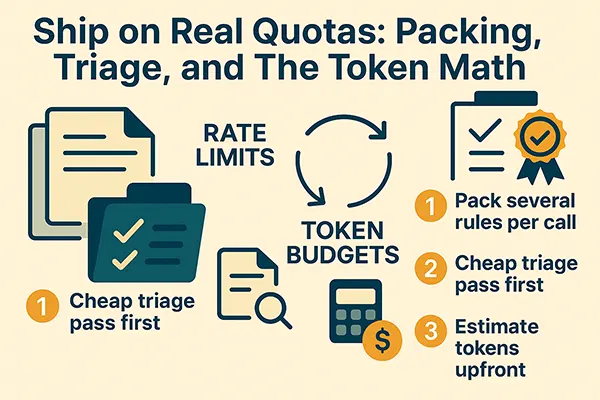
Ship on Real Quotas: Packing, Triage, and The Token Math
In Part 1 we argued that sending 500 pages to an LLM is a bad deal: you pay a lot, you wait a lot, and you still don’t get audit-ready citations. In Part 2 we showed how to find the right snippets without missing the good ones. Today is about the unglamorous constraint: rate limits and token budgets.
Azure and its peers limit requests per minute and tokens per minute. You can keep hating it, or you can shape your pipeline so it plays by those rules. The trick isn’t heroic engineering; it’s a few small choices that compound: pack several rules into each call, do a cheap triage pass before you do the thorough pass, and estimate your tokens so you don’t surprise either the API or your LLM bill.
Let's walk through the mindset, the math, and a few tiny C# helpers that keep you honest.
The mindset should be: let us stop thinking “one request = one rule”
It’s tempting to treat each rule like its own request: fetch two or three snippets, call the model, move on. That burns your requests per minute even though your tokens per minute might be fine. Instead, you want to batch rules into packs: three, five, maybe six rules per model call, so your request count stays tiny while your total tokens remain exactly the same.
Think of it like email. Sending five one line emails to the same person clutters their inbox and annoys them. Paste them into one message, and you’ve made everyone’s day better. Same here: the model has plenty of context to handle five small, uniform tasks in a single response.
A simple budget to plan around
Let’s define a few quantities:
- : number of rules in your catalog for this RFP (say, 80).
- : how many rules you pack into a single API call (say, 5).
- : how many snippets per rule you send (usually 2-3; we’ll use 3).
- : size in tokens of each snippet (target 180-240; we’ll use 200).
- : size in tokens of the rule text (keep it tight; say 25).
- : per-call prompt overhead (instructions, JSON schema), around 200-300 tokens; we’ll use 250.
- : average output size per rule (your JSON finding), around 120-160 tokens; we’ll use 140.
With those, one packed call has:
Total per call is the sum. The number of calls is (rounded up).
Let's plug in the numbers: .
- Calls needed:
The entire bidder analysis lands around 65k tokens. Even if you add a little air, you’re comfortably below 80k. That’s wildly better than pushing a quarter-million input tokens even once.
Now map this to quotas. If your tokens-per-minute limit is 50k, you can dispatch eight or nine calls and be under the cap. Wait a handful of seconds, dispatch the rest. Requests-per-minute? Sixteen calls is a rounding error compared to the usual “50 RPM” ceilings.
Triage first, then thorough: it’s not a hack, it’s a multiplier
Triage sounds like a shortcut, but in this context it’s just good manners. Most rules are obvious wins: the phrase “two percent (2%)” or “one hundred twenty (120) calendar days” either exists or it doesn’t. You don’t need three snippets to recognize that. So you run a first pass where each rule gets one best snippet, and you ask the model for a coarse label: Clear Pass, Borderline, or Missing. Only Borderline/Missing (and any mandatory rule you’re wary about) go to the thorough pass with two or three snippets.
The math is promising. Suppose half your rules are obvious and never escalate. Your tokens drop by roughly a third without compromising accuracy. Your reviewers also get first insights much faster because the triage responses come back sooner and in fewer calls.
Here’s a tiny C# sketch for a triage gate that keeps the thresholds configurable:
public enum TriageVerdict { ClearPass, Borderline, Missing }

public sealed record TriageItem(string RequirementId, TriageVerdict Verdict, double Confidence);

public static bool NeedsEscalation(TriageItem t, bool isMandatory)
{
    if (t.Verdict == TriageVerdict.Missing) return true;
    if (t.Verdict == TriageVerdict.Borderline) return true;
    // Even clear pass on mandatory can be escalated if confidence thin
    return isMandatory && t.Confidence < 0.6;
}
Throttling without a queuing system you’ll regret
You don’t need Kafka or a homegrown rate-limiter to stay under quotas. A sliding-minute token counter and a very boring “don’t fire if we’d cross the cap” check will do the job.
Here’s a pragmatic helper. It estimates the tokens for an outgoing call, compares it to the rolling minute, and either dispatches or sleeps for a tick. No drama.
public sealed class TokenBudget
{
    private readonly int _tpmLimit;  // tokens per minute
    private readonly Queue<(DateTime ts, int used)> _window = new();

    public TokenBudget(int tokensPerMinute) => _tpmLimit = tokensPerMinute;

    private void Sweep()
    {
        var cutoff = DateTime.UtcNow.AddMinutes(-1);
        while (_window.Count > 0 && _window.Peek().ts < cutoff) _window.Dequeue();
    }

    public async Task WaitForBudgetAsync(int tokensNeeded, CancellationToken ct)
    {
        while (true)
        {
            ct.ThrowIfCancellationRequested();
            Sweep();
            var used = _window.Sum(x => x.used);
            if (used + tokensNeeded <= _tpmLimit) break;
            await Task.Delay(250, ct); // quarter-second nap; keep it smooth
        }
        _window.Enqueue((DateTime.UtcNow, tokensNeeded));
    }
}
Pair this with a max concurrency of, say, three in-flight calls, and you’re comfortably under both tokens per minute and requests per minute in nearly all setups. If you do hit a 429, honor Retry-After and back off with a little jitter (random 200–600ms) so your calls don’t re-clash.
Why packs and triage don’t degrade accuracy
Two reasons. First, the evidence you send per rule is still the best the retrieval step could find; you didn’t change the snippets, you just sent several at once. Second, your must-cite contract and local quote verification keep the model honest. If it cannot copy a short quote from the provided text, it must say “Missing,” and your app will either escalate or mark the rule accordingly. You’re not letting the model invent compliance; you’re forcing it to point at it.
If you are still not convinced, we'll show you the math behind it, it will be presented in the next (fourth) blog in this series.
If you want a sanity metric to watch, track the reviewer edit rate: the percentage of findings your human reviewers change. When you introduce triage and packing, that number should not rise. If it does, your triage thresholds are too aggressive or your retrieval needs a nudge (for example, guarantee one table row for numeric rules).
A brief walk-through on our example bidder
Take the five-rule pack shown earlier. The triage pass would send one snippet per rule. The bid security rule would immediately come back Clear Pass because the exact phrase “two percent (2%)” appears in Section 3.2 and again in the bank’s guarantee page. The bid validity rule would be Clear Pass thanks to the “one hundred twenty (120) calendar days” sentence. The ISO rule would be Clear Pass with certificate numbers and expiry dates present. The meter performance rule might be Borderline if your single snippet didn’t include both IEC codes in the same breath; that’s fine, it escalates to a full pass with an extra snippet. The LDs rule likely comes back Clear Pass, since “0.1% per day capped at 10%” is an exact string in their commercial terms (in the fictitious example we use).
Your thorough pass now handles maybe twenty to thirty rules instead of all eighty, and it does so in, say, six to eight calls rather than sixteen. Your tokens drop, your latency drops, and you changed exactly nothing about your standards for evidence.
The last mile: control the expenses
Nobody likes surprises on the bill. Put the token math in code and print it before you dispatch. With the simple formulas above, you can forecast upper bounds for a run given . If you choose to enable triage, your UI can show a “best case” and “expected case,” then overlay a thin progress bar as results stream back. Procurement appreciates speed; Finance appreciates predictability.
Here’s a tiny estimator you can keep next to your dispatcher:
public sealed record TokenPlan(
    int Rules, int PackSize, int SnippetsPerRule,
    int SnippetTokens, int RuleTokens, int PromptOverhead, int OutputPerRule)
{
    public int Calls => (int)Math.Ceiling(Rules / (double)PackSize);

    public int TokensInPerCall => PromptOverhead + PackSize * (RuleTokens + SnippetsPerRule * SnippetTokens);
    public int TokensOutPerCall => PackSize * OutputPerRule;

    public int TotalTokens => Calls * (TokensInPerCall + TokensOutPerCall);
}
Run it with new TokenPlan(80, 5, 3, 200, 25, 250, 140) and log the totals next to the job. It sets expectations for everyone.
Putting the pieces together
If Part 1 was about reframing the problem and Part 2 was about finding the right words and numbers, Part 3 is about being a good citizen of your provider’s limits while staying within the financial constraints. Packs keep your requests-per-minute in check. Triage keeps your tokens-per-minute and wall-clock latency down. A tiny sliding counter keeps you out of trouble. The must-cite rule and local verification give you the confidence to move fast without breaking your audit trail.
Next up, we’ll write the measurement and QA post: the four numbers that tell you whether you can trust the machine (recall@K for mandatory rules, mandatory miss rate, reviewer edit rate, and time to first gate), plus a plain-English checklist for quote verification, page sanity, and catalog versioning. It will also include a dead-simple “evidence report” layout that your reviewers will love because it links straight to the page and shows the quote in context.
Discussion Board Coming Soon
We're building a discussion board where you can share your thoughts and connect with other readers. Stay tuned!
Ready for CTO-level Leadership Without a Full-time Hire?
Let's discuss how Fractional CTO support can align your technology, roadmap, and team with the business, unblock delivery, and give you a clear path for the next 12 to 18 months.
Or reach us at: info@sharplogica.com